


Download SkyUI – Skyrim mod, UI enhancement, PC game, mod for Skyrim, improve Skyrim interface, Skyrim interface overhaul, modern UI, Skyrim gameplay improvement
Overview
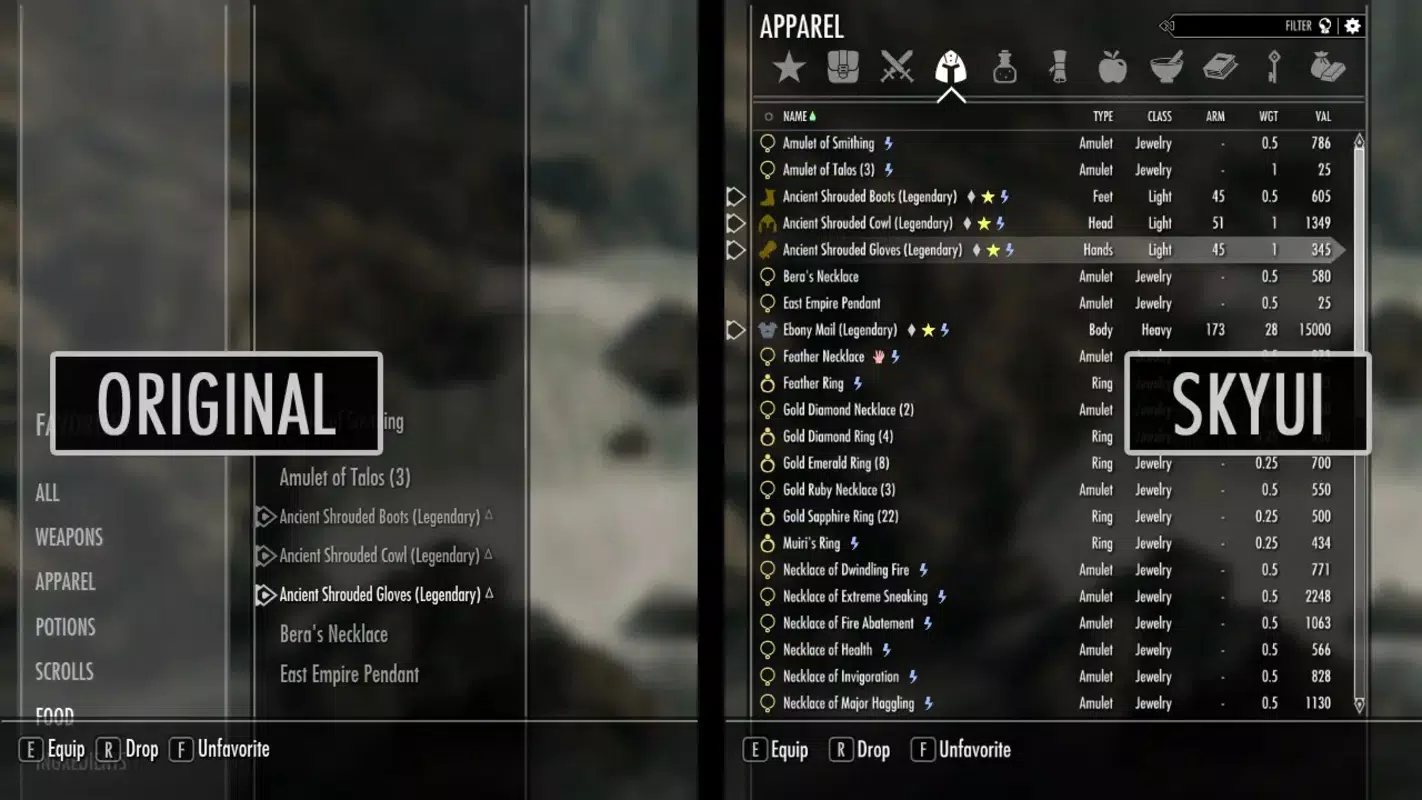
SkyUI is a transformative mod designed specifically for Skyrim on PC, aiming to modernize and streamline the game’s user interface. The mod addresses long-standing usability issues in the original game, particularly around inventory navigation, crafting, and menu responsiveness. By replacing outdated UI elements with a cleaner, more intuitive layout, SkyUI enhances player comfort during extended gameplay sessions. The primary purpose is to reduce friction in daily tasks such as equipping gear, managing resources, and crafting items—tasks that can become tedious in the base game.
Target users include both casual and hardcore Skyrim players who value efficiency and visual clarity. The mod is especially beneficial for those who frequently engage in crafting, exploration, or combat, where quick access to inventory and menus is crucial. The developer, SkyUI Team, has focused on seamless integration with the original game, ensuring that the mod functions without conflicts or instability. Although the developer did not provide additional technical details, the mod’s lightweight footprint and straightforward installation suggest a high level of optimization.
Real-world use cases include faster equipment switching during battles, reduced time spent searching for rare ingredients, and smoother crafting workflows. In the broader modding ecosystem, SkyUI stands out as a foundational enhancement, often recommended as a prerequisite for other UI-focused mods. Its ability to improve the overall user experience without altering core gameplay makes it a valuable tool for enhancing the longevity and enjoyment of Skyrim.
Key Features & Functionality
- Easy Installation: SkyUI can be installed in under two minutes by simply extracting the files into the game’s Data folder and enabling the mod via the Skyrim Launcher. This streamlined setup process ensures accessibility for users of all technical skill levels.
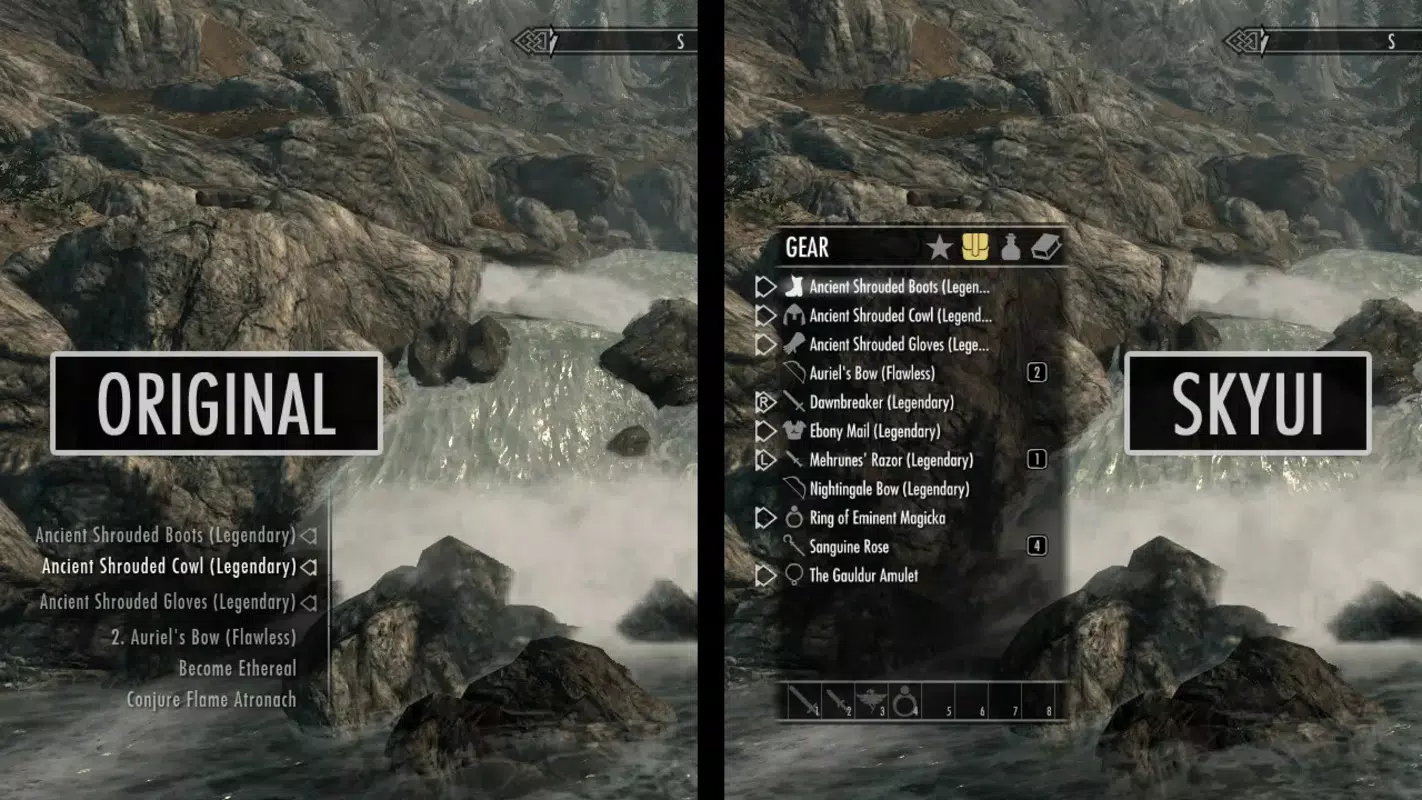
- Enhanced Inventory Management: The mod reorganizes inventory menus with improved layout and visual hierarchy. Items are grouped logically, and navigation is simplified, allowing players to quickly locate weapons, armor, and consumables—especially useful during combat or exploration.
- Improved Crafting Menus: Smithing, alchemy, and enchanting interfaces are redesigned for clarity and efficiency. Players can now browse recipes and materials with greater ease, reducing the need for repetitive menu cycling and enhancing the crafting experience.
- Integrated Search Functionality: A built-in search box in key menus enables instant access to specific items. This feature is particularly useful in large inventories, allowing players to locate rare or essential items without scrolling through hundreds of entries.
- Minimal File Size: At just 1.9 MB, SkyUI maintains a lightweight footprint, making it compatible with most mod collections and storage configurations. Despite its small size, the mod delivers substantial improvements in usability and workflow.
Each feature is designed to reduce cognitive load and increase immersion. For example, a player exploring the wilderness can quickly access healing potions without interrupting the flow of gameplay. Similarly, a crafter can experiment with new enchantments without navigating complex, cluttered menus. These enhancements collectively contribute to a more enjoyable and efficient Skyrim experience.
Interface, UX & Performance
The user interface of SkyUI adopts a modern, minimalist aesthetic that aligns with contemporary design standards. The layout emphasizes readability, with clear typography, intuitive iconography, and logical grouping of options. Menus are structured to minimize user effort, with consistent navigation patterns across inventory, crafting, and character management screens.
Navigation is smooth and responsive, with minimal lag or input delay. The mod maintains a high degree of compatibility with other UI-focused mods, though the developer did not specify any known conflicts. Although the developer did not list formal performance metrics, the mod’s small file size suggests minimal impact on system resources. Users on mid-range and high-end PCs should experience stable performance, with no reported crashes or freezes.
Responsiveness is consistent across different screen resolutions and aspect ratios, ensuring a uniform experience. The interface adapts well to various display settings, making it suitable for both single-monitor and multi-monitor setups. Stability is maintained through careful code optimization, and the mod has been widely adopted in the community without major issues. Overall, SkyUI delivers a polished and reliable UX that enhances gameplay without introducing technical drawbacks.
Platform Compatibility & Technical Requirements
SkyUI is designed exclusively for PC (Windows) platforms and requires the base game Skyrim Special Edition or Skyrim VR to function. The mod is compatible with the latest version, 2.0.2, and has a file size of 1.9 MB. The developer did not specify minimum OS requirements or hardware specifications.
Compatibility information was not fully disclosed, but the mod’s lightweight nature and straightforward installation suggest broad compatibility with most Windows systems. It is intended for use with the Skyrim Launcher and does not require additional software or runtime environments. Users should ensure they have sufficient permissions to modify the game’s Data folder.
Although the developer did not list formal performance metrics, the mod’s small size and efficient code imply minimal impact on system performance. It is recommended to install SkyUI before adding other UI mods to avoid potential conflicts.
Pros and Cons
Pros
- Extremely lightweight at just 1.9 MB
- Simple, fast installation process
- Significantly improves inventory and crafting navigation
- Includes a useful search function across menus
- Seamlessly integrates with the original game
- Free to download and use
Cons
- Not available for consoles or mobile platforms
- Specific system requirements were not listed
- May conflict with poorly optimized mods
- Requires manual installation via file extraction
- Does not alter gameplay mechanics or story content
FAQ
Is SkyUI safe to install?
Yes, SkyUI is a widely used and trusted mod in the Skyrim community. It is open-source and does not include malware or intrusive code. As with any mod, users should download it from official or verified sources to ensure authenticity.
Can I use SkyUI with other mods?
Yes, SkyUI is compatible with many other mods, especially those focused on UI improvements or gameplay enhancements. However, users should be cautious when combining it with other UI mods, as conflicts may arise. It is recommended to install SkyUI first and test compatibility with other mods.
Does SkyUI require a specific version of Skyrim?
SkyUI is designed for Skyrim Special Edition and Skyrim VR. It is not compatible with the original Skyrim release. Users should ensure they are running the correct version of the game before installation.
Is SkyUI free to use?
Yes, SkyUI is completely free. The developer does not charge for the mod, and there are no in-app purchases or hidden fees.
How often is SkyUI updated?
While the developer did not specify update frequency, the current version is 2.0.2, released on June 17, 2025. Updates are typically released to fix bugs, improve compatibility, or add minor enhancements based on community feedback.
Final Thoughts
SkyUI represents a significant leap forward in user experience for Skyrim players on PC. Its clean design, intuitive navigation, and practical features make it an essential tool for anyone seeking a smoother, more enjoyable gameplay session. The mod’s lightweight nature and ease of installation ensure that it’s accessible to players of all skill levels, while its focus on usability without altering core gameplay makes it a safe and reliable addition.
Whether you're a seasoned adventurer or a newcomer to the world of Tamriel, SkyUI enhances the overall experience by eliminating friction in daily tasks. Its value lies not in changing the game, but in making it more accessible and enjoyable. For players who want a modern, efficient interface that feels like a natural evolution of Skyrim, this mod is a must-have.
Download SkyUI now


